
Wedding Invitation Maker
Design a wedding invitation in seconds: five designer templates, your wording in real typography, live preview free. AI artwork and print-ready PDF when you are ready.
Pick a template, type your names and date, and watch the invitation update live — free, right on this page. The text is always real typography (AI never renders your names), and when the design is right, the Genie adds custom artwork and the print-ready PDF.
This free preview uses the template's built-in art. The Genie generates a custom AI art layer in your palette and a print-ready 5×7 PDF with bleed (2 credits — new accounts include 2 free trial generations). Photo cards are a WedGenie Pro exclusive: your own photo — even an AI engagement look from your Board — right on the card.
Finish it with the Genie →Live preview — your wording is set in real typefaces, never drawn by an image model.
How to use the Wedding Invitation Maker
Pick a template
Five designer directions — classic serif, modern minimal, botanical, and more. Switch freely; your wording follows.
Type your wording
Names, date line, venue line, and an optional extra. The preview updates as you type, set in the template's real typefaces.
Add the custom art layer
The Genie generates background artwork in your palette and style direction — full-bleed, designed to leave the typography room to breathe.
Export print-ready files
A 5×7 PDF with bleed at print resolution, plus a shareable preview PNG. Send the PDF straight to any print shop.
Wedding Invitation Maker examples
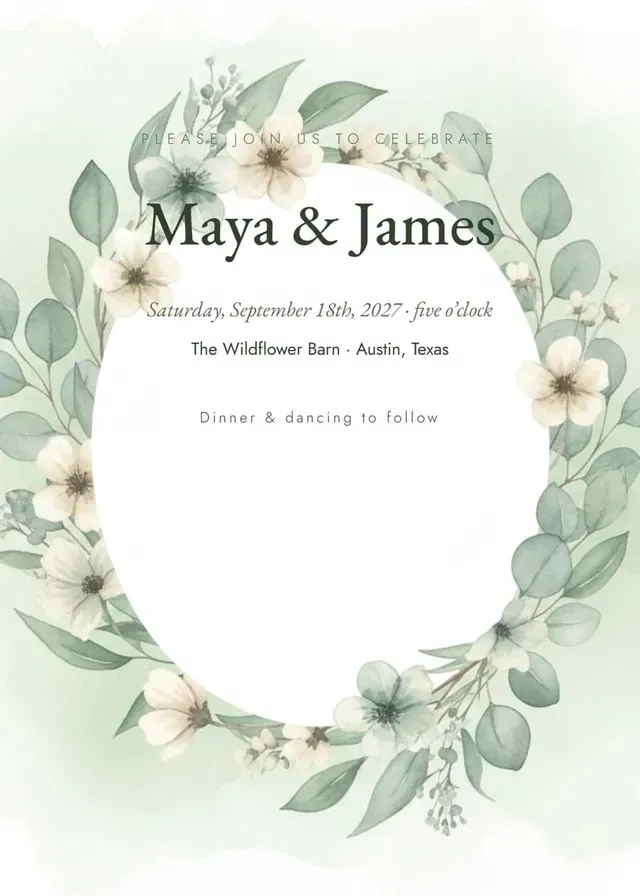
Unedited output from this exact pipeline — the botanical template with an AI-generated art layer and the wording set in real typefaces.
About the wedding invitation maker
AI image generators are spectacular at artwork and catastrophic at text — ask one to render "Saturday, June 14th" and you will get letters from a language that does not exist. WedGenie's invitation maker is built on a rule that fixes this: the art layer and the text layer are never the same thing. Your names, date, and venue are set in real typefaces — the kind with italics, kerning, and correct apostrophes — layered over the design, so every character is crisp at print resolution. On this page you can try all five templates with your own wording and watch the preview update live, free and without an account. When you are ready for the finished piece, the Genie generates a custom AI art layer in your palette and direction, and produces a print-ready 5×7 PDF with bleed — the file a print shop actually asks for.
- ✓Crisp, correct text — guaranteed by real typography
- ✓Five distinct design directions to try free
- ✓A print file shops accept without conversion
- ✓From idea to printable in one conversation
Who the Wedding Invitation Maker is for
Keep planning
More free wedding tools
Best Man Speech Generator
Write a best man speech that gets real laughs and lands the heartfelt ending. Free AI best man speech generator — your stories, your tone, drafted in a minute.
Maid of Honor Speech Generator
Write a maid of honor speech that captures your friendship and survives the happy tears. Free AI speech generator built from your real stories.
Groom Speech Generator
Write a groom speech that thanks the right people and says the thing your partner will remember. Free AI groom wedding speech generator.
Wedding Invitation Maker — questions couples ask
Yes — and this is the point of the whole design. Names, dates, and venue lines are set in real typefaces (Playfair Display, Cormorant Garamond, EB Garamond and friends), never generated by an image model, so the type is perfectly crisp at print size. AI is only ever used for the background artwork, where it excels.
Continue with the Genie
This tool is one small piece of WedGenie — an AI wedding planner that researches real vendors, tracks your checklist and budget, and remembers everything between conversations.
Plan my wedding with the Genie →